This chapter contains the connection guide for the M2M (Machine-to-Machine) machine interface for external clients. The DCC API provides the following M2M functions:
-
Authentication - Token request for M2M communication
-
DAC8 report submission - Crypto-Asset Reporting Framework (CARF) report management
-
DAC9 report submission - Global minimum tax report management
General HTTP communication rules:
-
TLS 1.3 or later version is mandatory
-
Request/Response in XML format, unless the specific endpoint requires a different format.
-
Character encoding is UTF-8 in all cases.
-
Maximum accepted request size is 1 MB, unless the specific endpoint specifies a different size limit.
-
Compression in GZIP format. When compressed data needs to be sent, the fastest, least compressing, level 1 compression ratio should be applied ("gzip -1 [FILE]").
-
The server typically responds with sub-300ms response times.
-
The blocking timeout for synchronous calls is 5000 ms. Please handle response times exceeding the above value as timeouts on the client side! The absolute timeout value is 60 sec. If no response is received for a submission due to the 60-second timeout, it does not necessarily mean the submission failed.
-
The server receives time settings from a closed NTP server not accessible to the outside world. Client-side synchronization to the server time is not required, but optionally the following time synchronization is available: http://www.pool.ntp.org/zone/hu (NTP client required for connection).
-
Clients are expected to anticipate API version changes (with pre-announced, plannable times), and to consider the version number when processing requests and responses.
1. Integration process overview
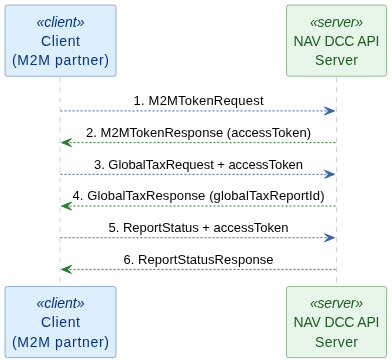
2. Authentication
2.1. Token request
The first step in M2M communication is requesting an access token through the Token API.
2.1.1. HTTP request
The access token is requested via an HTTP POST request with the following settings:
-
Base URL:
-
Path:
/dcc/m2m/v1/token -
HTTP method: POST
-
Headers:
-
Content-Type: text/xml or application/xml -
Accept: text/xml or application/xml
-
2.1.2. Request: M2MTokenRequest
The request is an extension of the NTCA LegacyAuthRequestType, which contains the standard
authentication header, user data, and software identifier.
<?xml version="1.0" encoding="UTF-8"?>
<ns3:M2MTokenRequest xmlns="http://schemas.nav.gov.hu/NTCA/2.0/common/service" xmlns:ns2="http://schemas.nav.gov.hu/NTCA/2.0/common/authservice"
    xmlns:ns3="http://schemas.nav.gov.hu/DCC/1.0/m2m/token/tokenapi">
    <context>
        <requestId>1779109982563</requestId>
        <timestamp>2026-03-13T10:02:55.372Z</timestamp>
    </context>
    <ns2:auth>
        <ns2:login>m2m_user_example</ns2:login> (1)
        <ns2:passwordHash cryptoType="SHA-512">12B03226A6D8BE9C6E8CD5E55DC6C7920CAAA39DF14AAB92D5E3EA9340D1C8A4D3D0B8E4314F1F6EF131BA4BF1CEB9186AB87C801AF0D5C95B1BEFB8CEDAE2B9</ns2:passwordHash> (2)
        <ns2:taxNumber>12345678</ns2:taxNumber> (3)
        <ns2:predecessorTaxNumber></ns2:predecessorTaxNumber> (4)
        <ns2:requestSignature cryptoType="SHA3-512">BD9CD4BB9CCCFB04AE24A206DAE13CDE067980074226E1B13CD56F46D678867AB01A79DE05F41197952384D1C1805C0BBC2ACA45A65070B8376B16972DB1EE57</ns2:requestSignature> (5)
    </ns2:auth>
    <ns2:requestVersion>1.0</ns2:requestVersion> (6)
    <ns2:headerVersion>1.0</ns2:headerVersion> (7)
</ns3:M2MTokenRequest>| 1 | The login tag contains the technical user’s name.
The login name is randomly generated by the system when creating the technical user, with a length of 15 characters.
The login tag is one of the authentication elements. |
| 2 | The passwordHash is the uppercase SHA-512 hash of the technical user’s password specified in the login tag.
The literal password is set by the primary user who creates the technical user on the Online Invoice web interface.
The passwordHash is one of the authentication elements.
The only accepted value: SHA-512. |
| 3 | The taxNumber is the first 8 digits of the tax number of the taxpayer on whose behalf the technical user operates and to whom they belong.
Only Hungarian tax numbers are accepted. |
| 4 | The predecessorTaxNumber, if provided, is validated to confirm
whether it has a legal predecessor relationship with the taxpayer specified in the taxNumber tag.
The legal predecessor relationship is checked recursively; indirect legal predecessors are also accepted.
Providing the predecessorTaxNumber affects the business logic of operations. |
| 5 | The requestSignature is the client-generated signature of the message.
Every request must have a requestSignature.
The server performs its own requestSignature calculation based on the data in the request and only executes the request
if the correct value can actually be derived from the stored and received data.
The "requestSignature calculation" section provides information about computing the requestSignature.
The only accepted value: SHA3-512. |
| 6 | The requestVersion indicates the request version; it is optional - if omitted, the system will use "1.0". Currently only the "1.0" value is accepted. |
| 7 | The headerVersion indicates the header version; it is optional - if omitted, the system will use "1.0". Currently only the "1.0" value is accepted. |
requestSignature calculation
The requestSignature is one of the main elements of interface authentication.
Its purpose is to prevent unauthorized parties from making changes in the system.
The hash value is verified by the server side for every request of every operation,
and the operation is only executed if the correct value can actually be derived from the stored and received data.
The requestSignature is calculated by concatenating the values of the following fields, in order:
-
requestId value (in our case "1779109982563")
-
the timestamp tag value with the "yyyyMMddHHmmss" mask, in UTC time (in our case "20260313100255")
-
the literal value of the technical user’s signing key (the value provided when creating the technical user). For this example, let its value be "ce-8f5e-215119fa7dd621DLMRHRLH2S"
The uppercase SHA3-512 hash result of the string concatenated in this order is the requestSignature value.
requestSignature = SHA3-512(requestId + timestamp + signingKey).UPPERCASE()

requestSignature = SHA3-512(1779109982563 + 20260313100255 + ce-8f5e-215119fa7dd621DLMRHRLH2S).UPPERCASE()

requestSignature = SHA3-512(177910998256320260313100255ce-8f5e-215119fa7dd621DLMRHRLH2S).UPPERCASE()

requestSignature = bd9cd4bb9cccfb04ae24a206dae13cde067980074226e1b13cd56f46d678867ab01a79de05f41197952384d1c1805c0bbc2aca45a65070b8376b16972db1ee57.UPPERCASE()

requestSignature = BD9CD4BB9CCCFB04AE24A206DAE13CDE067980074226E1B13CD56F46D678867AB01A79DE05F41197952384D1C1805C0BBC2ACA45A65070B8376B16972DB1EE57import java.time.OffsetDateTime;
import java.time.format.DateTimeFormatter;
import org.apache.commons.lang3.StringUtils;
import org.bouncycastle.jcajce.provider.digest.SHA3;
import org.bouncycastle.util.encoders.Hex;
public final class UamSignGeneratorExample {
public static String uamAlgorithm(String requestId, OffsetDateTime timestamp, String xmlSignKey) {
DateTimeFormatter formatter = DateTimeFormatter.ofPattern("yyyyMMddHHmmss");
String timestampString = formatter.format(timestamp);
String concatenated = StringUtils.join(requestId, timestampString, xmlSignKey);
SHA3.DigestSHA3 md = new SHA3.DigestSHA3(512);
md.update(concatenated.getBytes());
byte[] digest = md.digest();
String hexDigest = Hex.toHexString(digest);
return StringUtils.upperCase(hexDigest);
}
}2.1.3. Response: M2MTokenResponse
Upon successful authentication, the response contains the access token and its expiration time.
<?xml version="1.0" encoding="UTF-8"?>
<ns3:M2MTokenResponse xmlns="http://schemas.nav.gov.hu/NTCA/2.0/common/service" xmlns:ns2="http://schemas.nav.gov.hu/NTCA/2.0/common/authservice"
    xmlns:ns3="http://schemas.nav.gov.hu/DCC/1.0/m2m/token/tokenapi">
    <context>
        <requestId>019ce66a-c965-74cd-9795-1102575b62b7</requestId>
        <timestamp>2026-03-13T08:58:04.006840049Z</timestamp>
    </context>
    <resultCode>SUCCESS</resultCode>
    <ns3:accessToken>eyJhbGciOiJIUzI1NiIsInR5cC... JWT token</ns3:accessToken>
    <ns3:accessTokenExpiryAt>2026-03-13T13:59:07.478552281Z</ns3:accessTokenExpiryAt>
</ns3:M2MTokenResponse>| Field | Description | Type |
|---|---|---|
|
The access token value to be used for subsequent API calls |
|
|
The token expiration time (UTC, nanosecond precision) |
|
| The token must be renewed before the expiration time. Requests sent with an expired token will be rejected. |
2.2. Token request error codes
List of error codes occurring during DCC API M2M authentication communication.
List of error codes occurring during the M2M token request.
| Error code | Description | What to do? |
|---|---|---|
|
Invalid SSO login data or missing right! |
The submitted SSO login data is invalid, or the user does not have the appropriate rights! Check the submitted SSO login data and the rights. |
|
SSO signature is invalid! |
Check the calculation of the SSO 'requestSignature' value. |
|
The received request timestamp is invalid! |
Check the submitted SSO 'M2MTokenRequest/context/timestamp' value; it cannot be too old or a future timestamp. |
|
Invalid login data or missing right! |
Check that the M2M user has the appropriate rights in the DCC system (Not the SSO rights, those have already been successfully logged in). |
|
The provided request ID already exists! |
Check the submitted 'GlobalTaxRequestType/context/requestId' value. |
|
SSO error! |
Try again, or contact customer support. |
3. DAC8
3.1. DAC8 CarfRequest report submission
With the access token in hand, the DAC-8 CARF (Crypto-Asset Reporting Framework) report can be submitted.
3.1.1. HTTP request
The report is submitted via an HTTP POST request with the following settings:
-
Base URL:
-
Path:
/dcc/m2m/v1/dac8/carf/report -
HTTP method: POST
-
Headers:
-
Authorization: Bearer {access_token} -
Content-Type: multipart/form-data -
Accept: text/xml or application/xml
-
-
Body: Two-part multipart/form-data:
-
metadata- The XML representation ofCarfRequest-
Content-Type: application/xml
-
-
report- The report file (Crypto-Asset Reporting Framework (CARF) XML Schema).-
Content-Type: application/octet-stream -
If the file is not compressed, it must be sent as plaintext XML
-
If the file is compressed (gzip), the compressed raw binary stream must be sent.
-
The maximum allowable file size is 100 MB (both compressed and uncompressed). If the file is compressed, the size of the decompressed content must not exceed 250 MB.
-
-
Character encoding is UTF-8 in all cases
-
When submitting, the CRC32 checksum of the file content must also be provided in the
reportChecksumfield. If the file is compressed, the CRC32 value of the decompressed content must be provided.
-
3.1.2. Request: CarfRequest
<ns2:CarfRequest xmlns="http://schemas.nav.gov.hu/NTCA/2.0/common/service"
    xmlns:ns2="http://schemas.nav.gov.hu/DCC/1.0/m2m/dac8/carf/carfapi">
    <context>
        <requestId>01a05da9-d9a9-7c41-ad31-fcdd4fc3066f</requestId>
        <timestamp>2026-09-01T15:50:07.531273284Z</timestamp>
    </context>
    <ns2:compressedContent>false</ns2:compressedContent>
    <ns2:reportType>CARF_OECD_V1_5</ns2:reportType>
    <ns2:reportChecksum cryptoType="CRC32">891091852</ns2:reportChecksum>
</ns2:CarfRequest>| Field | Description | Required |
|---|---|---|
|
|
Yes |
|
The report type. Currently the only allowed value is: |
Yes |
|
The checksum of the report ( |
Yes |
3.1.3. Response: CarfResponse
<?xml version="1.0" encoding="UTF-8"?>
<ns2:CarfResponse xmlns="http://schemas.nav.gov.hu/NTCA/2.0/common/service"
    xmlns:ns2="http://schemas.nav.gov.hu/DCC/1.0/m2m/dac8/carf/carfapi">
    <context>
        <requestId>01a05da9-d9a9-7c41-ad31-fcdd4fc3066f</requestId>
        <timestamp>2026-09-01T15:50:07.531273284Z</timestamp>
    </context>
    <resultCode>SUCCESS</resultCode>
    <ns2:carfReportId>01a05d95-016f-7747-9a01-2180d7307079</ns2:carfReportId>
</ns2:CarfResponse>| Field | Description |
|---|---|
|
The unique transaction identifier of the submitted report. This identifier is required to query the report status. |
3.2. DAC8 Report status query
The technical processing status of a submitted report can be queried based on the transaction identifier.
3.2.1. HTTP request
The report status is queried via an HTTP GET request with the following settings:
-
Base URL:
-
Path:
/dcc/m2m/v1/dac8/carf/report/{carfReportId}/status -
HTTP method: GET
-
Headers:
-
Authorization: Bearer {access_token} -
Accept: text/xml or application/xml
-
3.2.2. Response: ReportStatusResponse
<?xml version="1.0" encoding="UTF-8"?>
<ns2:ReportStatusResponse xmlns="http://schemas.nav.gov.hu/NTCA/2.0/common/service"
    xmlns:ns2="http://schemas.nav.gov.hu/DCC/1.0/m2m/dac8/carf/carfapi">
    <context>
        <requestId>01a05da9-d9a9-7c41-ad31-fcdd4fc3066f</requestId>
        <timestamp>2026-09-01T15:50:07.531273284Z</timestamp>
    </context>
    <resultCode>SUCCESS</resultCode>
    <ns2:reportStatus>
        <ns2:status>VALID</ns2:status>
    </ns2:reportStatus>
</ns2:ReportStatusResponse>| Status | Action |
|---|---|
|
The report has been uploaded. Wait and query the status again. |
|
The report is being validated. Wait and query the status again. |
|
The report is valid, technically processed successfully. |
|
The report has been approved by the user. No further action is required. |
|
The report has been declined by the user. No further action is required. |
|
The report is invalid. Check the |
<?xml version="1.0" encoding="UTF-8"?>
<ns2:ReportStatusResponse xmlns="http://schemas.nav.gov.hu/NTCA/2.0/common/service"
    xmlns:ns2="http://schemas.nav.gov.hu/DCC/1.0/m2m/dac8/carf/carfapi">
    <context>
        <requestId>01a05da9-d9a9-7c41-ad31-fcdd4fc3066f</requestId>
        <timestamp>2026-09-01T15:50:07.531273284Z</timestamp>
    </context>
    <resultCode>SUCCESS</resultCode>
    <ns2:reportStatus>
        <ns2:status>INVALID</ns2:status>
        <ns2:errorCode>INVALID_FILE</ns2:errorCode>
        <ns2:anomaly>
            <field>exampleField</field>
            <error>Invalid value in column 12, line 34</error>
            <lineNumber>34</lineNumber>
            <columnNumber>12</columnNumber>
        </ns2:anomaly>
        <ns2:anomaly>
            <error>Another error without line and column information</error>
        </ns2:anomaly>
    </ns2:reportStatus>
</ns2:ReportStatusResponse>
3.3. DAC8 Error codes
List of error codes occurring during DCC API M2M communication.
| Error code | Description | What to do? |
|---|---|---|
|
The given request ID already exists in the system! |
Check the submitted 'CarfRequestType/context/requestId' value. |
|
The given checksum already exists in the system! |
Check the submitted 'CarfRequestType/reportChecksum' value. |
|
The given value is invalid! |
One of the required fields has an invalid value. Check the submitted 'CarfRequestType' object. |
|
The unpacked size of the request exceeded the allowable limit! |
The size of the submitted multipart GZIP (gz) compressed object exceeds the maximum size when unpacked. |
|
The checksum of the submitted object does not match! |
Check that the checksum of the submitted multipart object matches the 'CarfRequestType/reportChecksum' value. Make sure that the submitted file is not corrupted. |
|
The uploaded file is not a valid compressed file! |
Check that the uploaded file is a valid GZIP (gz) compressed file. |
|
An error occurred while storing the payload! |
Try uploading again later, or contact customer support! |
4. DAC9
4.1. DAC9 GlobalTaxRequest report submission
With the access token in hand, the DAC-9 global minimum tax report can be submitted.
4.1.1. HTTP request
The report is submitted via an HTTP POST request with the following settings:
-
Base URL:
-
Path:
/dcc/m2m/v1/dac9/globaltax/report -
HTTP method: POST
-
Headers:
-
Authorization: Bearer {access_token} -
Content-Type: multipart/form-data -
Accept: text/xml or application/xml
-
-
Body: Two-part multipart/form-data:
-
metadata- The XML representation ofGlobalTaxRequest-
Content-Type: application/xml
-
-
report- The report file (GloBE Information Return (Pillar Two) XML Schema).-
Content-Type: application/octet-stream -
If the file is not compressed, it must be sent as plaintext XML
-
If the file is compressed (gzip), the compressed raw binary stream must be sent.
-
The maximum allowable file size is 100 MB (both compressed and uncompressed). If the file is compressed, the size of the decompressed content must not exceed 250 MB.
-
-
Character encoding is UTF-8 in all cases
-
When submitting, the CRC32 checksum of the file content must also be provided in the
reportChecksumfield. If the file is compressed, the CRC32 value of the decompressed content must be provided.
-
4.1.2. Request: GlobalTaxRequest
<ns2:GlobalTaxRequest xmlns="http://schemas.nav.gov.hu/NTCA/2.0/common/service"
    xmlns:ns2="http://schemas.nav.gov.hu/DCC/1.0/m2m/dac9/globaltax/globaltaxapi">
    <context>
        <requestId>019ce6cd-394b-7622-9c01-6880b92f086d</requestId>
        <timestamp>2026-03-13T10:45:35.180339322Z</timestamp>
    </context>
    <ns2:compressedContent>false</ns2:compressedContent>
    <ns2:reportType>GLOBE_OECD_V1</ns2:reportType>
    <ns2:reportChecksum cryptoType="CRC32">639479525</ns2:reportChecksum>
</ns2:GlobalTaxRequest>| Field | Description | Required |
|---|---|---|
|
|
Yes |
|
The report type. Currently the only allowed value is: |
Yes |
|
The checksum of the report ( |
Yes |
4.1.3. Response: GlobalTaxResponse
<?xml version="1.0" encoding="UTF-8"?>
<ns2:GlobalTaxResponse xmlns="http://schemas.nav.gov.hu/NTCA/2.0/common/service"
    xmlns:ns2="http://schemas.nav.gov.hu/DCC/1.0/m2m/dac9/globaltax/globaltaxapi">
    <context>
        <requestId>019ce6cd-394b-7622-9c01-6880b92f086d</requestId>
        <timestamp>2026-03-13T10:45:35.180339322Z</timestamp>
    </context>
    <resultCode>SUCCESS</resultCode>
    <ns2:globalTaxReportId>019ce6cd-4540-78a7-ac4f-5049465a1fa0</ns2:globalTaxReportId>
</ns2:GlobalTaxResponse>| Field | Description |
|---|---|
|
The unique transaction identifier of the submitted report. This identifier is required to query the report status. |
4.2. DAC9 Report status query
The technical processing status of a submitted report can be queried based on the transaction identifier.
4.2.1. HTTP request
The report status is queried via an HTTP GET request with the following settings:
-
Base URL:
-
Path:
/dcc/m2m/v1/dac9/globaltax/report/{globalTaxReportId}/status -
HTTP method: GET
-
Headers:
-
Authorization: Bearer {access_token} -
Accept: text/xml or application/xml
-
4.2.2. Response: ReportStatusResponse
<?xml version="1.0" encoding="UTF-8"?>
<ns2:ReportStatusResponse xmlns="http://schemas.nav.gov.hu/NTCA/2.0/common/service"
    xmlns:ns2="http://schemas.nav.gov.hu/DCC/1.0/m2m/dac9/globaltax/globaltaxapi">
    <context>
        <requestId>019cf6ac-b11c-74b6-8b8c-0832f6805328</requestId>
        <timestamp>2026-03-16T12:43:58.620345274Z</timestamp>
    </context>
    <resultCode>SUCCESS</resultCode>
    <ns2:reportStatus>
        <ns2:status>VALID</ns2:status>
    </ns2:reportStatus>
</ns2:ReportStatusResponse>| Status | Action |
|---|---|
|
The report has been uploaded. Wait and query the status again. |
|
The report is being validated. Wait and query the status again. |
|
The report is valid, technically processed successfully. |
|
The report has been approved by the user. No further action is required. |
|
The report has been declined by the user. No further action is required. |
|
The report is invalid. Check the |
<?xml version="1.0" encoding="UTF-8"?>
<ns2:ReportStatusResponse xmlns="http://schemas.nav.gov.hu/NTCA/2.0/common/service"
    xmlns:ns2="http://schemas.nav.gov.hu/DCC/1.0/m2m/dac9/globaltax/globaltaxapi">
    <context>
        <requestId>019cf6ac-b11c-74b6-8b8c-0832f6805328</requestId>
        <timestamp>2026-03-16T12:43:58.620345274Z</timestamp>
    </context>
    <resultCode>SUCCESS</resultCode>
    <ns2:reportStatus>
        <ns2:status>INVALID</ns2:status>
        <ns2:errorCode>INVALID_FILE</ns2:errorCode>
        <ns2:anomaly>
            <field>exampleField</field>
            <error>Invalid value in column 12, line 34</error>
            <lineNumber>34</lineNumber>
            <columnNumber>12</columnNumber>
        </ns2:anomaly>
        <ns2:anomaly>
            <error>Another error without line and column information</error>
        </ns2:anomaly>
    </ns2:reportStatus>
</ns2:ReportStatusResponse>
4.3. DAC9 Error codes
List of error codes occurring during DCC API M2M communication.
| Error code | Description | What to do? |
|---|---|---|
|
The given request ID already exists in the system! |
Check the submitted 'GlobalTaxRequestType/context/requestId' value. |
|
The given checksum already exists in the system! |
Check the submitted 'GlobalTaxRequestType/reportChecksum' value. |
|
The given value is invalid! |
One of the required fields has an invalid value. Check the submitted 'GlobalTaxRequestType' object. |
|
The unpacked size of the request exceeded the allowable limit! |
The size of the submitted multipart GZIP (gz) compressed object exceeds the maximum size when unpacked. |
|
The checksum of the submitted object does not match! |
Check that the checksum of the submitted multipart object matches the 'GlobalTaxRequestType/reportChecksum' value. Make sure that the submitted file is not corrupted. |
|
The uploaded file is not a valid compressed file! |
Check that the uploaded file is a valid GZIP (gz) compressed file. |
|
An error occurred while storing the payload! |
Try uploading again later, or contact customer support! |
5. OpenAPI
6. Java client example
Using the dto-auth-jakarta, dto-dac8-jakarta, and dto-dac9-jakarta Maven modules,
request-response objects can be handled directly from Java.
6.1. Maven dependencies
<dependencyManagement>
    <dependencies>
        <dependency>
            <groupId>hu.gov.nav.dcc.api</groupId>
            <artifactId>bom-project</artifactId>
            <version>1.1.0-SNAPSHOT</version>
            <type>pom</type>
            <scope>import</scope>
        </dependency>
    </dependencies>
</dependencyManagement>

<dependencies>
    <dependency>
        <groupId>hu.gov.nav.dcc.api</groupId>
        <artifactId>dto-auth-jakarta</artifactId>
    </dependency>
    <dependency>
        <groupId>hu.gov.nav.dcc.api</groupId>
        <artifactId>dto-dac8-jakarta</artifactId>
    </dependency>
    <dependency>
        <groupId>hu.gov.nav.dcc.api</groupId>
        <artifactId>dto-dac9-jakarta</artifactId>
    </dependency>
</dependencies>
6.2. Token request assembly
import hu.gov.nav.schemas.dcc._1_0.m2m.token.tokenapi.M2MTokenRequest;
import hu.gov.nav.schemas.dcc._1_0.m2m.token.tokenapi.M2MTokenResponseType;

// Create token request (fluent API)
M2MTokenRequest tokenRequest = new M2MTokenRequest();
// ... set header, user, and software data

// Process response
M2MTokenResponseType response = // ... HTTP call result
String accessToken = response.getAccessToken();
OffsetDateTime expiryAt = response.getAccessTokenExpiryAt();
6.3. DAC8 report submission
import hu.gov.nav.schemas.dcc._1_0.m2m.dac8.carf.carfapi.CarfRequest;
import hu.gov.nav.schemas.dcc._1_0.m2m.dac8.carf.carfapi.CarfResponseType;
import hu.gov.nav.schemas.dcc._1_0.m2m.dac8.carf.carfapi.ReportStatusResponseType;

// Report registration request
CarfRequest request = new CarfRequest();
request.setCompressedContent(true);
request.setReportType(ReportTypeType.CARF_OECD_V_1_5);
// ... set checksum

// Process response
CarfResponseType carfResponse = // ... HTTP call result
String reportId = carfResponse.getGlobalTaxReportId();

// Status query
ReportStatusResponseType statusResponse = // ... HTTP call result
FileStatusType status = statusResponse.getReportStatus().getStatus();
6.4. DAC9 report submission
import hu.gov.nav.schemas.dcc._1_0.m2m.dac9.globaltax.globaltaxapi.GlobalTaxRequest;
import hu.gov.nav.schemas.dcc._1_0.m2m.dac9.globaltax.globaltaxapi.GlobalTaxResponseType;
import hu.gov.nav.schemas.dcc._1_0.m2m.dac9.globaltax.globaltaxapi.ReportStatusResponseType;

// Report registration request
GlobalTaxRequest request = new GlobalTaxRequest();
request.setCompressedContent(true);
request.setReportType(ReportTypeType.GLOBE_OECD_V_1);
// ... set checksum

// Process response
GlobalTaxResponseType taxResponse = // ... HTTP call result
String reportId = taxResponse.getGlobalTaxReportId();

// Status query
ReportStatusResponseType statusResponse = // ... HTTP call result
FileStatusType status = statusResponse.getReportStatus().getStatus();